
+- delphi4arab منتديات دلفي للعرب (https://delphi4arab.net/forum)
+-- قسم : منتديات دلفي للعرب التعليمية (https://delphi4arab.net/forum/forumdisplay.php?fid=3)
+--- قسم : سؤال و جواب حول دلفي (https://delphi4arab.net/forum/forumdisplay.php?fid=15)
+--- الموضوع : ربط ميزان الباركود بجهاز الكمبيوتر (/showthread.php?tid=11189)
الصفحات:
1
2
ربط ميزان الباركود بجهاز الكمبيوتر - صالح حمادي - 31-12-2020
السلام عليكم و رحمة الله تعالى و بركاته
ما هي طريقة ربط ميزان الباركود بجهاز الكمبيوتر لتسجيل السلع فيه
عندي ميزان من نوع Aclas LS21530E و أريد التحكم فيه من خلال جهاز الكمبيوتر بحثت عن البرنامج الخاص به و لم أجده
فمن لديه معلومة بهذا الخصوص ينورنا بها و بارك الله فيكم مسبقا
RE: ربط ميزان الباركود بجهاز الكمبيوتر - Delphi4Us - 01-01-2021
وعليكم السلام ورحمة الله تعالى و بركاته
لم افهم ما المقصود بميزان الباركون فهل تقصد الباركود
ولو كان جهاز الباركود لم افهم ما المقصود بميزانه
ولو كان المقصود كيف تسجل السلعة بجهاز الباركود فهو لا يملك برنامج بمجرد توصيله بالـ USB يتم التعرف عليه بخاصية التركيب والتشغيل
وبمجرد ان تم تركيبه مرر امامه اي سلعة لها باركود ومؤشر الفأرة بالمفكرة او بمكون EDIT وسوف يكتب لك رقم الباركود
في تسجيل السلعة بمجرد حصولك على رقم الباركود وانت طبعا في حالة اضافة تضع اسم السلعة وسعرها وتحفظها
وهكذا مع كامل السلعة
وبعدها في عملية البيع في الحدث EditChanged تبحث عن السلعة برقم الباركود الذي تم تمريره وتضعه في المبيعات بسعر بيعه
RE: ربط ميزان الباركود بجهاز الكمبيوتر - صالح حمادي - 01-01-2021
بارك الله فيك أخي على المداخلة
ما أقصد هو جهاز الميزان الذي يستخدم في سوبر ماركت لبيع الخضر و الفواكه و يقوم بطباعة ملصق فيه الكودبار لتمريره أمام برنامج البيع
ما أريده هو كيف أصمم برنامج بالدلفي يمكنني من تسجيل الأصناف في الميزان من خلال الكمبيوتر
مع العلم أن الميزان يتم ربطه عن طريق كابل الشبكة
و قد حصلت على كود سورس الشركة لكني لم أعرف كيف أوظفه و هذا رابط البرنامج
http://www.mediafire.com/file/6ufea8ez7chfsvo/Carpeta_Integracion_Balanza_LS21530EC_v0.4.rar/file
RE: ربط ميزان الباركود بجهاز الكمبيوتر - larbiparadox - 02-01-2021
وعليكم السلام ورحمة الله تعالى و بركاته
من سؤالك تريد برمجة الميزان ، سأحاول رفع الملف الذي أعطيتنا أياه
- كيف يربط مع الحاسوب ، هل من الشبكة أو Port Com
حسب سؤالك تريد كهذا المثال
https://www.youtube.com/watch?v=i2jBHbseWHU
RE: ربط ميزان الباركود بجهاز الكمبيوتر - صالح حمادي - 02-01-2021
نعم أريد هكذا المثال
لكن بتصميمه على الدلفي من خلال المرفقات الموجود في الرابط أو أي طريقة أخرى
الميزان يرتبط عبر الشبكة مع الحاسوب
RE: ربط ميزان الباركود بجهاز الكمبيوتر - Delphi4Us - 03-01-2021
لا اعرف هذا الجهاز اول مرة اراه
على العموم انا شاهدت الفيديو وفيه طريقة ربطه بشبكة بالنسبة لدلفي اعتقد بعد ربطه وتعريفه على الشبكة سيعمل تماما مثل اجهزة الباركود العادية يعني بمجرد المسح او التسجيل به ولا اعرف كيف نظامه سيعطيك رقم المنتج بمكان المؤشر .
تحتاج ان يكون لديك الجهاز وتقوم بربطه وبعدها تجربته
RE: ربط ميزان الباركود بجهاز الكمبيوتر - larbiparadox - 03-01-2021
(03-01-2021, 01:15 PM)Delphi4Us كتب : لا اعرف هذا الجهاز اول مرة اراه
على العموم انا شاهدت الفيديو وفيه طريقة ربطه بشبكة بالنسبة لدلفي اعتقد بعد ربطه وتعريفه على الشبكة سيعمل تماما مثل اجهزة الباركود العادية يعني بمجرد المسح او التسجيل به ولا اعرف كيف نظامه سيعطيك رقم المنتج بمكان المؤشر .
تحتاج ان يكون لديك الجهاز وتقوم بربطه وبعدها تجربته
حسب الفيديو ، يحتوي الميزان على قاعدة بيانات محدودة الحقول و السطور ، لما تبرمجه مثال : السطر رقم 1 تفاح و بعدها ثمنه و كود المنتوج
* عند عملية البيع تكون انت تعرف رقم كل منتوج ، تضع الرقم المنتوج على الجهاز و من رقم يعرف الجهاز ما هو ثمنه و يطبع تعريفة حسب الوزن الموضوع
RE: ربط ميزان الباركود بجهاز الكمبيوتر - صالح حمادي - 03-01-2021
(03-01-2021, 01:15 PM)Delphi4Us كتب : لا اعرف هذا الجهاز اول مرة اراه
على العموم انا شاهدت الفيديو وفيه طريقة ربطه بشبكة بالنسبة لدلفي اعتقد بعد ربطه وتعريفه على الشبكة سيعمل تماما مثل اجهزة الباركود العادية يعني بمجرد المسح او التسجيل به ولا اعرف كيف نظامه سيعطيك رقم المنتج بمكان المؤشر .
تحتاج ان يكون لديك الجهاز وتقوم بربطه وبعدها تجربته
ليس مثل أجهزة الباركود
هو جهاز لديه قاعدة بيانات محددة و فيها حقول مثلما قال الأخ larbiparadox
يشبه كثيرا جهاز البصمة
لديه ملفات خاصة و كود سورس الخاص به يأتي من الشركة لربطه بالدلفي و جميع لغات البرمجة
أنا أحتاج لطريقة تعامل الدلفي مع الأجهزة الخارجية مثل جهاز البصمة و الميزان
RE: ربط ميزان الباركود بجهاز الكمبيوتر - larbiparadox - 08-01-2021
بعد تحميل المصدر الذي أعطيتنا إياه ، بعد الفحص
- أولا هذا المثال يعتمد في إتصاله على ملف PBusDrv.dll ، فهو الملف الاساسي لبرمجة الميزان أو تحميل البيانات منه
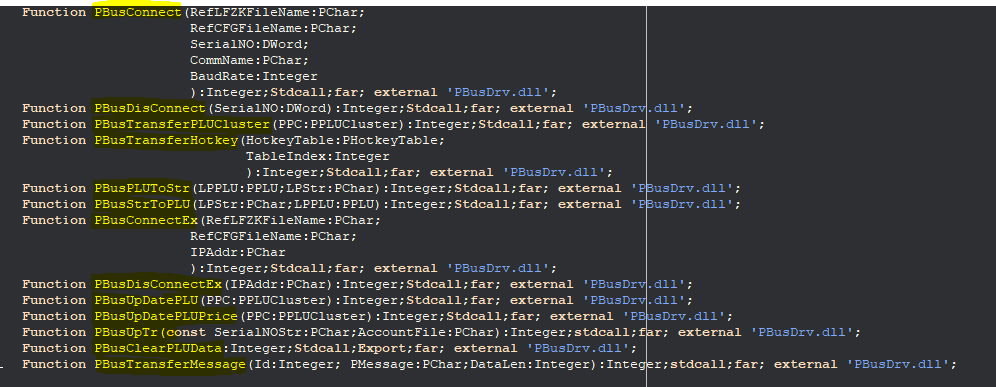
الكلمات الملونة بالأصفر أسماء الاجراءات لاتصال و التحميل و تخزين
- معلومات عن الميزان من ملف PBUSDRV02.pdf يحتوي على أسماء الحقول و كيف التعامل مع ملف PBusDrv.dll
كود :
PBusDrv.DLL use explanation

PBusDrv.DLL is a 32 digit dynamic link libraries, mostly is used to download PLU data to
Pinncale label scale.
Main Data structure and function: (Delphi syntax. For other languages, please refer to
use):

1.Data structure
TPlu=record //PLU data structure
 Name: PChar; //product name, 36 characters
 LFCode: Longint; //Lfcode,1-999999,only way to identify each kind of product
 Code: PChar; //product code,10 digit, used to form barcode
 BarCode: Longint; //barcode type,0-99
 UnitPrice: Longint; //unit price, did not have decimal mode, 0-9999999
 WeightUnit: Longint; //weight unit 0-12
 Deptment: Longint; //department,2 number, used to form barcode
 Tare: Double; //tare weight, it should within 15Kg after logic conversion
 ShlefTime: Longint; //shelf time,0-365
 PackageType: Longint; //package type,0:normal/ limitative weight mode,1:weight
fixed,
 //2:price fixed,3:barcode printer mode
 PackageWeight:Double; //package weight/limitative weight, it should within 15Kg
after logic conversion
 Tolerance: Longint; //package error tolerance,0-20
 Message1: Byte; //message 1,0-197
 Reserved: Byte; //reserved
 Reserved1: Word; //reserved
 Message2: Byte; //message 2,0-197
 Reserved2: Byte; //reserved
 MultiLabel: Byte; //multi-label,0-255,8 Bit corresponding to A0-D1
respectively
 Rebate: ShortInt; //rebate,0-99
 Account: LongInt; //enter an item in an account, reserved
 end;
 PPLU=^TPLU;
 TPLUCluster=Array[0..3]of TPLU; //one PLU cluster including 4 pcs PLU
 PPLUCluster=^TPLUCluster;
 THotkeyTable=Array[0..83]of LongInt; //each array element is a PLU lfcode,
 //84 pcs element corresponding to 84 pcs PLU
 PHotkeyTable=^THotkeyTable;

 For detailed explanation, please refer to user manual’s program interface part.

2.Function(suppose label scale sw (LBMNC) is installed under XX directory)
Connect function
Function PBusConnect(RefLFZKFileName:PChar;//lf font list file name,including path,
 //usually point to XX\bin\lfzk.dat
 //if used character set,point to
XX\bin\lfzkfull.dat
RefCFGFileName:PChar; //configuration file name, including path,
usually point to //XX\bin\system.cfg
SerialNO:DWord; //label scale serial number, if is Ethernet,
please transfer IP address as
//DWord,such as 192.168.0.1 transfer to
$C0A80001
 CommName:PChar; //equipment name, such as:COM1,COM2,if is
Ethernet, it is:IP
 BaudRate:Integer //communication speed, set as 0
 ):Integer;far; external 'PbusDrv.dll';

Function PBusConnectEx(RefLFZKFileName:PChar;// lf font list file name, including path,
 //usually point to XX\bin\lfzk.dat
 //if use character set,point to
XX\bin\lfzkfull.dat
RefCFGFileName:PChar; //configuration file name, including path,
usually point to //XX\bin\system.cfg
 IPAddr: PChar; //label scale IP address, such as:192.168.0.1
 ):Integer;far; external 'PbusDrv.dll';

Disconnect function
Function PBusDisConnect(SerialNO: DWord //label scale serial no.
 ):Integer;far; external 'PbusDrv.dll';

Function PBusDisConnectEx(IPAddr: PChar; //label scale IP address,such as:192.168.0.1
 ):Integer;far; external 'PbusDrv.dll';

send PLU function
Function PBusTransferPLUCluster(PPC:PPLUCluster //PLU cluster
 ):Integer;far; external 'PbusDrv.dll';

send Hotkey function
Function PBusTransferHotkey(HotkeyTable:PHotkeyTable; //hotkey list
 TableIndex:Integer //hotkey list no., total two list,0
and 1
 ):Integer;far; external 'PbusDrv.dll';

send message function
Function PBusTransferMessage(Id:Integer; //info code,1~197
 PMessage:PChar; //information text
 DataLen:Integer //information text length
 ):Integer;far; external 'PBusDrv.DLL';

transform PLU to character string
Function PBusPLUToStr(LPPLU:PPLU; //PLU data
 LPStr:PChar //character string(one line of TXP file),
this finger must distribute space.
 ):Integer;Stdcall;far; external 'PbusDrv.dll';

transform character string to PLU
Function PBusStrToPLU(LPStr:PChar; //character string(one line to TXP file)
 LPPLU:PPLU //PLU data
 ):Integer;Stdcall;far; external 'PbusDrv.dll';
clear all PLU
Function PBusClearPLUData:Integer;Stdcall;far; external 'PBusDrv.dll';

upload PLU data
Function PBusUpLoadPLU(index:Integer; PPC:PPLUCluster):Integer;stdcall;Export;
upload Hotkey Data
Function PBusUpLoadHotKey(HotkeyTable:PHotkeyTable;TableIndex:Integer):Integer;stdcall;
Export;

upload sales report
Function PBusUpLoadOR(fileName:PChar):Boolean;stdcall;Export;

set Scrolling Message
Function PBusSetADInfo(value:PChar):Boolean;stdcall;Export;

3.Flow
(1) PBusConnect if returned value<0, jump out
 |
(2) PBusTransferPLUCluster/PBusTransferHotkey if returned value<0, jump to (4)
 |
(3) PBusTransferPLUCluster/PBusTransferHotkey if returned value<0, jump to (4)
 |
 . if returned value<0, jump to (4)
 .
 .
(4) PBusDisConnect

4.Examples
 Example under Delphi60 catalog is writen with Delphi, could pass test under Delphi6.0.
Example under VB60 catalog is written with Visual Basic, could pass test under VB6.0.
 Example under VC60 catalog is written with Visual C++, could pass test under VC6.0.
 Example under PB65 catalog is written with PowerBuilder, could pass test under PB6.5.

Remarks: Remarks:
1.Explanation of lf font bank and system parameter Explanation of lf font bank and system parameter
PbusConnect connect function cites two file: lfzk.dat and system.cfg, lfzk.dat is lf
font bank character list,store some system setting in system.cfg . We intensively
suggest to cite corresponding file under link32 install catalog,to make sure that when
Link32 sw modifying system parameter, it could reflect to dynamic link libraries in
time。For example:There is a option “lf common font bank usage character set” of link32
system option,after modification of it, this parameter setting will be stored in
system.cfg,if PbusConnect connect function cites system.cfg of link32 setting
catalog ,the dynamic link libraries will download using new configure, or it will
confuse the font bank. Of course, you could place these two file on other places, but
must make sure update these two file in time and in-phase.
2.Setting of data Setting of data Setting of data alignmode of mode of mode of delphi6 and Delphi7.
Set delphi6 and delphi7 as below,
Project->Options->Code generation->Record field alignment select 4
If do not want to change default setting (default value is 8) of Delphi data align mode
or use Delphi5,could use PBusDrv.DLL of other catalog.
و لاتصال بالميزان نحتاج إلى إلى الاعدادات كاللتي في الصورة

و لكيفية العمل تحتاج إلى الربط مع الجهاز و التجريب
* و يمكنك برمجته مباشرة بالملف التنفيذي SCaleAssistant.exe الموجود في SCaleAssistant في الملف SCaleList.bin تجد عنوان الشبكة و تغيره
و الملفات التي تضع فيها القيم يدويا موجودة في SCaleAssistant و الموجودة مجلد Demo و هي متنوعة ، يجب فتحها و تغيير محتواها بعدها تحميلها الى الميزان أو القراءة منه
في الاخير لتجد النتيجة عليك ، البتجريب و التكرار
أما المثال الخاص بالدلفي يحتوي مكونات خارجية مكونان tnt و Raize
شرح الحقول
 TXP.rar (الحجم : 10.64 ك ب / التحميلات : 48)
RE: ربط ميزان الباركود بجهاز الكمبيوتر - صالح حمادي - 08-01-2021
ألف شكر شيخنا
بالنسبة للربط و التجريب فقد قمت بذلك من قبل و نجح معي الأمر
و ما دفعني إلى طرح هذا الموضوع هو رغبتي في تصميم برنامج يرسل البيانات من قاعدة بياناتي مباشرة الى الميزان دون الاعتماد على برامج وسيطة.
الآن و بعد شرحك هذا سوف أبدأ بتحليل و تجريب الدوال التي أشرت إليها إن شاء الله
و عند الإنتهاء سوف أخبرك بذلك و أضع تجربتي مع ميزان الباركود هنا في المنتدى بإذن الله
ألف ألف شكر مرة أخرى أستاذنا الغالي