23-02-2023, 02:37 PM

23-02-2023, 03:46 PM
(23-02-2023, 02:37 PM)salah07230 كتب : [ -> ]السلام عليكم
اين اجد هذا المكون
عبارة عن كمبوبوكس مع الهيدر
وشكرا
وعليك السلام
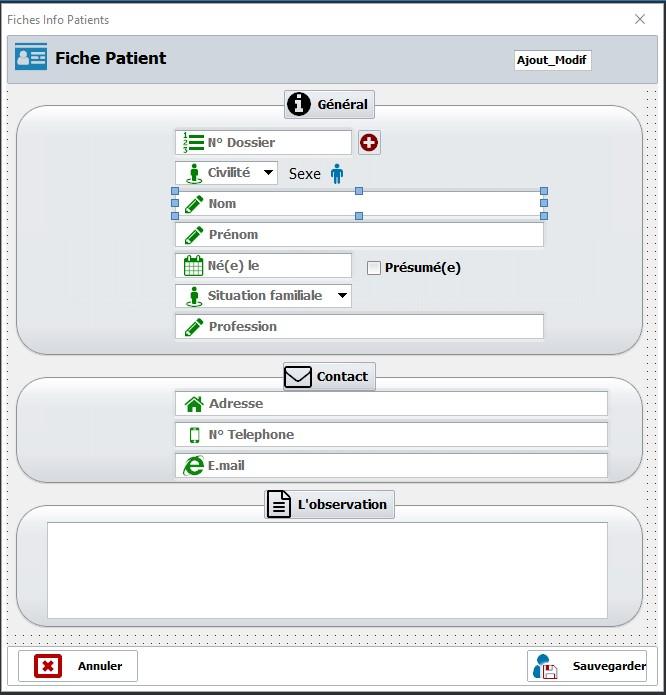
على ما أعتقد هي مكونات edit الخاصة بـAlphaControls هو مكون خاص بـ skin يوجد معاه مكونات edit بالنسبة للإقونات يعمل معها مكون اخر إسمه sCharImageList خاص بقراءة الرموز الموجودة في أنواع من الخطوط مثل Font Awesome و توجد خطوط إحتارفية مثل Font Awesome Pro يعتمد عليها خاصة أصحاب مواقع الانترنت لأن لها مزايا عدة
مثال : هذه صورة من برنامج عملت عليه
23-02-2023, 04:02 PM
بارك الله فيك أخي الكريم لكني ابحث عن هيدر الكمبوبوكس
25-02-2023, 10:08 AM
وعليكم السلام ورحمة الله
ماذا تقصد بالهيدركمبوبوكس
اذا كنت تقصد الشريط الازرق الذي يجمع الادوات فهذا عبارة عن Panel اعتقد ستجد له خاصية اظهار Title له
ماذا تقصد بالهيدركمبوبوكس
اذا كنت تقصد الشريط الازرق الذي يجمع الادوات فهذا عبارة عن Panel اعتقد ستجد له خاصية اظهار Title له
25-02-2023, 12:22 PM
نعم اخي اقصد الشريط الازرق
25-02-2023, 01:18 PM
الادوات التي ذكرها لك الاخ فوق فيها الاداة واعتقد هي الـ Panel او GroubPanel لا اذكر ابحث عنها في الادوات وابحث بخصائصها
ملاحظة وهي لا تتبع الكمبوبكس وانما panel تم وضع الادوات تلك بداخلها
ملاحظة وهي لا تتبع الكمبوبكس وانما panel تم وضع الادوات تلك بداخلها
25-02-2023, 01:23 PM
بارك الله فيك أخي غدا ساجرب
26-02-2023, 11:00 AM
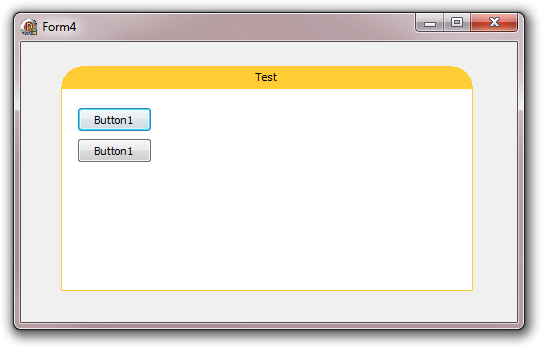
وجدت الحل لكني لم استطع تطبيقة فهل من مساعدة بمتال تطبيقي وشكرا
كود :
unit CustomCaptionPanel;

interface

uses
  Windows, SysUtils, Classes, Controls, Graphics;

type
  TCustomCaptionPanel = class(TCustomControl)
  private const
    DEFAULT_BORDER_COLOR = $0033CCFF;
    DEFAULT_CLIENT_COLOR = clWindow;
    DEFAULT_BORDER_RADIUS = 16;
  private
    { Private declarations }
    FBorderColor: TColor;
    FClientColor: TColor;
    FBorderRadius: integer;
    FCaption: TCaption;
    FAlignment: TAlignment;
    procedure SetBorderColor(BorderColor: TColor);
    procedure SetClientColor(ClientColor: TColor);
    procedure SetBorderRadius(BorderRadius: integer);
    procedure SetCaption(const Caption: TCaption);
    procedure SetAlignment(Alignment: TAlignment);
  protected
    { Protected declarations }
    procedure Paint; override;
  public
    { Public declarations }
    constructor Create(AOwner: TComponent); override;
  published
    { Published declarations }
    property Color;
    property Caption read FCaption write SetCaption;
    property Alignment: TAlignment read FAlignment write SetAlignment default taCenter;
    property Font;
    property BorderColor: TColor read FBorderColor write SetBorderColor default DEFAULT_BORDER_COLOR;
    property ClientColor: TColor read FClientColor write SetClientColor default DEFAULT_CLIENT_COLOR;
    property BorderRadius: integer read FBorderRadius write SetBorderRadius default DEFAULT_BORDER_RADIUS;
  end;

procedure Register;

implementation

procedure Register;
begin
  RegisterComponents('Rejbrand 2009', [TCustomCaptionPanel]);
end;

{ TCustomCaptionPanel }

constructor TCustomCaptionPanel.Create(AOwner: TComponent);
begin
  inherited;
  ControlStyle := [csAcceptsControls, csCaptureMouse, csClickEvents,
    csSetCaption, csOpaque, csDoubleClicks, csReplicatable, csPannable];
  FBorderColor := DEFAULT_BORDER_COLOR;
  FClientColor := DEFAULT_CLIENT_COLOR;
  FBorderRadius := DEFAULT_BORDER_RADIUS;
  FAlignment := taCenter;
end;

procedure TCustomCaptionPanel.Paint;
var
  r: TRect;
const
  Alignments: array[TAlignment] of integer = (DT_LEFT, DT_RIGHT, DT_CENTER);
begin
  inherited;
  Canvas.Pen.Color := FBorderColor;
  Canvas.Brush.Color := FBorderColor;
  Canvas.Brush.Style := bsSolid;
  Canvas.FillRect(Rect(FBorderRadius,
    0,
    ClientWidth - FBorderRadius,
    FBorderRadius));
  Canvas.Ellipse(Rect(0,
    0,
    2*FBorderRadius,
    2*FBorderRadius));
  Canvas.Ellipse(Rect(ClientWidth - 2*FBorderRadius,
    0,
    ClientWidth,
    2*FBorderRadius));
  Canvas.Brush.Color := FClientColor;
  Canvas.Rectangle(Rect(0,
    FBorderRadius,
    ClientWidth,
    ClientHeight));
  Canvas.Font.Assign(Self.Font);
  r := Rect(FBorderRadius, 0, ClientWidth - FBorderRadius, FBorderRadius);
  Canvas.Brush.Style := bsClear;
  DrawText(Canvas.Handle,
    PChar(Caption),
    length(Caption),
    r,
    DT_SINGLELINE or DT_LEFT or DT_VCENTER or DT_END_ELLIPSIS or Alignments[FAlignment]);
end;

procedure TCustomCaptionPanel.SetAlignment(Alignment: TAlignment);
begin
  if FAlignment <> Alignment then
  begin
    FAlignment := Alignment;
    Invalidate;
  end;
end;

procedure TCustomCaptionPanel.SetBorderColor(BorderColor: TColor);
begin
  if FBorderColor <> BorderColor then
  begin
    FBorderColor := BorderColor;
    Invalidate;
  end;
end;

procedure TCustomCaptionPanel.SetBorderRadius(BorderRadius: integer);
begin
  if FBorderRadius <> BorderRadius then
  begin
    FBorderRadius := BorderRadius;
    Invalidate;
  end;
end;

procedure TCustomCaptionPanel.SetCaption(const Caption: TCaption);
begin
  if not SameStr(FCaption, Caption) then
  begin
    FCaption := Caption;
    Invalidate;
  end;
end;

procedure TCustomCaptionPanel.SetClientColor(ClientColor: TColor);
begin
  if FClientColor <> ClientColor then
  begin
    FClientColor := ClientColor;
    Invalidate;
  end;
end;

end.26-02-2023, 12:50 PM
قمت بالتعديل عليه ليتسنى استعماله بطرية سهلة ,,,,
المهم يجب دائما اضافة CustomCaptionPanel بعد ExtCtrls حتى يتم تحويل Panel العادي الى هذا النوع الجديد
انظر الى الملف المرفق,,,
المهم يجب دائما اضافة CustomCaptionPanel بعد ExtCtrls حتى يتم تحويل Panel العادي الى هذا النوع الجديد
انظر الى الملف المرفق,,,
كود :
unit CustomCaptionPanel;

interface

uses
  Windows, SysUtils, Classes, Controls, Graphics, ExtCtrls;

type
  TPanel = class(ExtCtrls.TPanel)
  private
    FEnableHeader :boolean;
    { Private declarations }
    FBorderColor: TColor;
    FBorderRadius: integer;
    procedure SetBorderColor(BorderColor: TColor);
    procedure SetBorderRadius(BorderRadius: integer);
    procedure SetEnableHeader(const Value: boolean);
  protected
    { Protected declarations }
    procedure Paint; override;
  public
    { Public declarations }
    constructor Create(AOwner: TComponent); override;
    property BorderColor: TColor read FBorderColor write SetBorderColor;
    property BorderRadius: integer read FBorderRadius write SetBorderRadius;
    property EnableHeader:boolean read FEnableHeader write SetEnableHeader;
  end;

implementation

{ TCustomCaptionPanel }

constructor TPanel.Create(AOwner: TComponent);
begin
  inherited;
  FBorderColor :=  $0033CCFF;;
  FBorderRadius :=  16;
end;

procedure TPanel.Paint;
var
  r: TRect;
const
  Alignments: array[TAlignment] of integer = (DT_LEFT, DT_RIGHT, DT_CENTER);
begin
  if not FEnableHeader then
  begin
     inherited;
     Exit;
  end;
  Canvas.Pen.Color := FBorderColor;
  Canvas.Brush.Color := FBorderColor;
  Canvas.Brush.Style := bsSolid;
  Canvas.FillRect(Rect(FBorderRadius,
    0,
    ClientWidth - FBorderRadius,
    FBorderRadius));
  Canvas.Ellipse(Rect(0,
    0,
    2*FBorderRadius,
    2*FBorderRadius));
  Canvas.Ellipse(Rect(ClientWidth - 2*FBorderRadius,
    0,
    ClientWidth,
    2*FBorderRadius));
  Canvas.Brush.Color := Color;
  Canvas.Rectangle(Rect(0,
    FBorderRadius,
    ClientWidth,
    ClientHeight));
  Canvas.Font.Assign(Self.Font);
  r := Rect(FBorderRadius, 0, ClientWidth - FBorderRadius, FBorderRadius);
  Canvas.Brush.Style := bsClear;
  DrawText(Canvas.Handle,
    PChar(Caption),
    length(Caption),
    r,
    DT_SINGLELINE or DT_LEFT or DT_VCENTER or DT_END_ELLIPSIS or Alignments[Alignment]);
end;

procedure TPanel.SetBorderColor(BorderColor: TColor);
begin
  if FBorderColor <> BorderColor then
  begin
    FBorderColor := BorderColor;
    Invalidate;
  end;
end;

procedure TPanel.SetBorderRadius(BorderRadius: integer);
begin
  if FBorderRadius <> BorderRadius then
  begin
    FBorderRadius := BorderRadius;
    Invalidate;
  end;
end;

procedure TPanel.SetEnableHeader(const Value: boolean);
begin
  FEnableHeader := Value;
  if FEnableHeader then
    BevelOuter :=bvNone
  else
    BevelOuter :=bvRaised;
  Invalidate;
end;

end.26-02-2023, 01:00 PM
بارك الله فيك اخي Ndagor
جزاك الله خيرا
حلت المشكلة بفضلك
جزاك الله خيرا
حلت المشكلة بفضلك